

You built your Instagram page from nothing. You wrote the captions, styled the flat lays, replied to every DM at 11pm, and slowly — order by order — built something real.
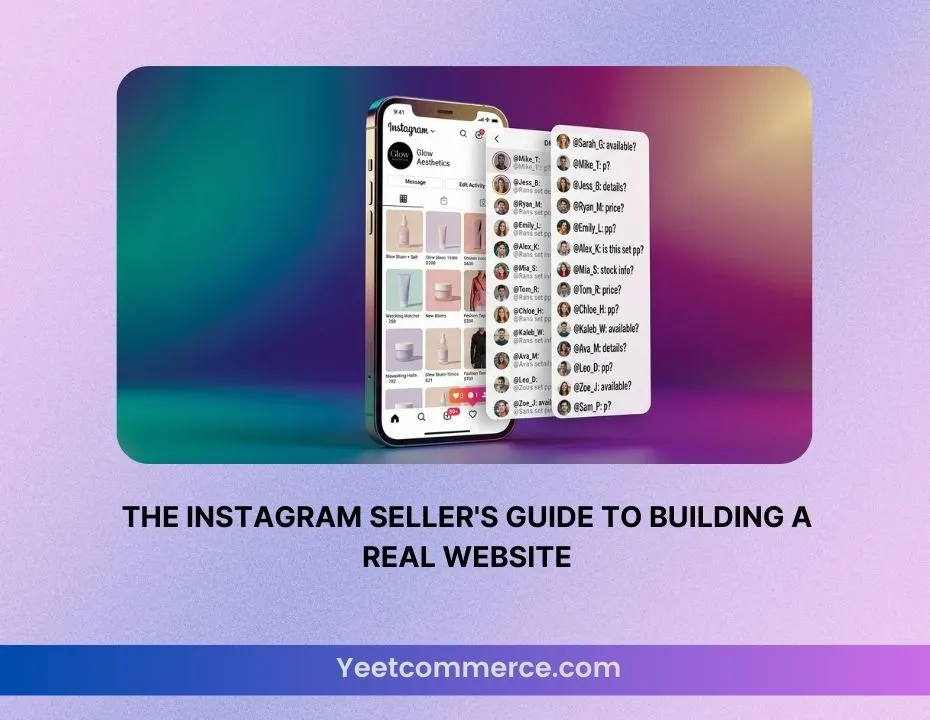
But you’re still running your business through a link in bio, a Google Form, and a shared Excel sheet.
Here’s the truth nobody wants to say out loud: Instagram is a marketing channel. It was never designed to be a store. And the longer you run your business through DMs, the more customers you’re losing to competitors who look more professional — even if their products aren’t as good as yours.
This guide is for sellers exactly like you. We’re not going to tell you to abandon Instagram — it’s one of your best assets. We’re going to show you how to build a real website around it, so every follower you’ve earned has somewhere to go, trust you, and buy from you properly.
| In this guide: Why Instagram alone is holding your business back • What a “real website” actually gives you • How to build one without a developer or a big budget • How to connect it to your Instagram so nothing breaks • What to do on day one after you launch |
Part 1: Why Instagram Is Not Enough (Even If It’s Working)
Let’s get one thing clear first: Instagram is incredible for discovery. The algorithm can put your products in front of thousands of potential buyers with a single Reel. That reach is valuable and you should keep using it.
But Instagram has four fundamental problems when you use it as your primary storefront.
Problem 1: You don’t own your audience
Every follower you have lives on Meta’s platform. If Instagram changes its algorithm, shadowbans your account, or goes down for a day — your business goes down with it. A website gives you an asset you actually own.
Problem 2: You look informal
Customers make trust decisions in seconds. An Instagram profile — no matter how beautiful — signals “small side hustle.” A proper website with your own domain signals “real brand.” That one perception gap is costing you sales every day.
Problem 3: The buying experience is painful
DM to confirm availability. Wait for a reply. Get a bank account number. Screenshot the transfer. Wait for confirmation. Then wait for shipping. Every extra step is a chance for the customer to change their mind. A website with a cart and checkout removes all of that friction instantly.
Problem 4: You have no customer data
When someone buys through Instagram DMs, you have a chat log. When someone buys through your website, you have their name, email, address, order history, and the ability to market to them again. That data is the foundation of a real business.
Here’s what the research shows about buyer trust and websites:
| Signal | Instagram-only seller | Seller with a website |
| First impression | Informal, unclear pricing | Professional, credible |
| Cart abandonment | Very high (DM friction) | Lower (streamlined checkout) |
| Repeat purchase rate | Low (no data capture) | Higher (email follow-up) |
| Average order value | Limited by DM negotiation | Higher (upsells, bundles) |
| Customer trust score | Medium | High |
Part 2: What a “Real Website” Actually Gives You
When we say “real website,” we don’t mean a complicated tech project that takes months and costs thousands. We mean a simple, professional online store that does five things well.
- A domain. Your own domain name
Something like YourBrandName.com. This is the single biggest credibility upgrade you can make. It costs less than Rs. 2,000 a year and the difference it makes to how customers perceive you is enormous.
- A proper product page. A product catalogue that works
Clear photos. A proper description. Sizes, variants, stock status. Price displayed clearly. An Add to Cart button. That’s it. Not complicated — but it needs to exist somewhere that isn’t a highlight reel.
- Checkout. A checkout that works
Cash on delivery, bank transfer, Stripe — however your customers pay, the process should take under two minutes and require zero back-and-forth with you.
- Order management. An order management system
You need to know what orders are pending, what’s been shipped, what’s been delivered. Not from a WhatsApp thread — from a proper dashboard. This alone will save you hours every week.
- Customer data. A way to recapture customers
Email addresses. Order history. The ability to send a discount code when someone hasn’t bought in 60 days. This is how small brands become lasting businesses.
Part 3: How to Build Your Website Without a Developer
The most common reason Instagram sellers delay building a website is the assumption that it requires technical skills or a big budget. Neither is true anymore.
Here’s the exact process to go from zero to a live store, in order.
Step 1: Choose a platform built for sellers, not developers
The platform you choose matters more than anything else. You need something that:
- Doesn’t require any coding knowledge
- Gives you a free plan so you can start without financial risk
- Doesn’t charge you transaction fees on every sale
- Includes tools like SEO, email marketing, and CRM without extra charges
- Has mobile-optimised templates (because most of your customers will buy on their phones)
| Why this matters: Most popular platforms charge you a monthly fee before you make your first sale, then take a percentage of every transaction on top of that. On a Rs. 50,000/month business, that can easily add up to Rs. 5,000–8,000 gone before you see a rupee. Look for a platform that charges zero platform fees — your margins already work hard enough. |
Step 2: Pick a template that matches your brand
You don’t need to design anything from scratch. Good e-commerce platforms come with professional templates built for specific product types — clothing, beauty, food, accessories, home goods. Pick one that’s closest to your aesthetic and customise the colours and fonts to match your Instagram brand palette.
Rule of thumb: your website and your Instagram should feel like they belong to the same brand. Same colours. Same tone. Same energy.
Step 3: Upload your products properly
This is where most sellers rush and it shows. Take the time to do this right:
- Use square or portrait photos (1:1 or 4:5 ratio works best on mobile)
- Write a description that answers the top 3 questions customers ask you in DMs
- Set clear pricing — no “DM for price”, ever
- Add stock quantities so customers know what’s available
- Group products into categories so people can browse easily
Step 4: Set up your payment and delivery options
Set up every payment method your customers already use. If you currently take bank transfers and EasyPaisa, those should be available on your site too. Don’t make customers learn a new payment method — meet them where they are.
For delivery, set clear timelines and shipping fees upfront. Hidden charges at checkout are the number one reason for abandoned carts.
Step 5: Connect your own domain
Buy a domain from any registrar (Namecheap, GoDaddy, or even through your e-commerce platform). Connect it to your store — most platforms make this a five-minute process with step-by-step instructions. Then update your Instagram bio link immediately.
Part 4: How to Connect Your Website to Instagram Without Losing Momentum
This is the part most guides skip. Building the website is one thing — integrating it with your existing Instagram presence is where the real magic happens.
Update your bio link immediately
The moment your store is live, your bio link should go directly to your product catalogue or a featured collection. Not your homepage — your products. People come from Instagram already interested; send them straight to what they came for.
Use Instagram Shopping tags
Once your store is connected, you can tag products directly in your posts and Reels. When someone taps the tag, they go straight to that product page on your website. This turns every piece of content you’ve ever made into a potential checkout moment.
Create content that bridges both platforms
Your Instagram content shouldn’t change — keep doing what’s working. But now, give people a reason to go to your website:
- “Full collection available on our website — link in bio”
- “Sizes selling out fast — order secured only when you check out”
- “Exclusive bundle deal available on YourBrand.com this week only”
Use Stories to drive website traffic
Instagram Stories with a link sticker are one of the most direct traffic drivers available. Use them daily. Show a product, share a customer review, announce a restock — then add the link to the exact product page, not just your homepage.
Collect emails from day one
Add a simple email sign-up offer somewhere on your website — “10% off your first order when you subscribe.” Every email you collect is a customer you can reach without Instagram’s algorithm deciding whether they see your post.
Part 5: What to Do on Day One After You Launch
You built the store. You connected it to Instagram. Now what?
Here’s your day-one checklist:
- Announce it like it’s a product launch.
Post a Reel, a carousel, and three Stories announcing your website. Show your customers around. Make it exciting — because it is. You just levelled up.
- DM your most engaged followers.
Go through your DMs and personally message the customers you know. Tell them you’ve launched a proper store and share the link. Personal outreach to your warmest audience will drive your first website orders.
- Place a test order yourself.
Go through the entire purchase journey as a customer. Find anything that feels confusing or slow and fix it immediately. Your first impression matters.
- Set up one automated email.
Even just an order confirmation email. When a customer places their first order and gets a professional confirmation in their inbox, it signals that this is a real business. That moment builds loyalty.
- Don’t stop posting on Instagram.
Your website doesn’t replace your Instagram — it amplifies it. Keep creating content. Keep engaging. The difference is that now, every post you make has somewhere to go.
| Real talk: The first week after launch will feel slow. You might get zero website orders while your Instagram DMs are still full. That’s normal. Keep driving traffic. Announce again at the end of the week. Share your link in every Story. It takes consistency, not just a launch post. |
Part 6: The Mistakes to Avoid
After watching thousands of sellers make the transition from Instagram-only to a proper online store, these are the most common mistakes — and how to avoid them.
- Mistake 1: Launching with too few products. You need at least 8–10 products live before you announce. Empty stores feel untrustworthy.
- Mistake 2: Making the checkout complicated. Every extra step you add to checkout loses customers. Keep it as simple as possible.
- Mistake 3: Not mobile-optimising. Over 85% of your Instagram audience will land on your store from a phone. Test everything on mobile before you launch.
- Mistake 4: Hiding the price. “DM for price” is the fastest way to lose a buyer in 2025. Put prices on every product, always.
- Mistake 5: Paying platform fees on every sale. Choose a platform that takes zero commission. Your margins are already thin — don’t give them away.
The Bottom Line
Instagram got you here. It built your audience, proved your product, and showed you there is a market for what you sell. That’s not a small thing — most businesses never get that far.
But Instagram was always meant to be the top of your funnel, not the entire funnel. The sellers who build real, lasting businesses are the ones who take what Instagram gave them and build something permanent around it.
A proper website doesn’t just make you look more professional. It captures customer data, reduces buying friction, enables automation, and gives you an asset that is entirely yours — no algorithm, no platform risk, no DM chaos.
You’ve already done the hardest part: building an audience that trusts you. Now give them somewhere worthy of that trust.
| Ready to build your store? YeetCommerce gives Instagram sellers a professional online store — for free, with zero platform fees, built-in AI, and no developer needed. Launch today and give your audience somewhere to buy from you properly. Create Your Free Store → yeetcommerce.com |
© YeetCommerce | yeetcommerce.com | Zero platform fees. Forever.